Voter ID 2026: A Voter ID is one of the most familiar documents associated with India’s electoral system, but the card itself is only one part of a much larger process. The more fundamental question is whether a citizen’s name and details are correctly included in the electoral roll for the constituency where the person is ordinarily resident.
The Election Commission of India (ECI) now provides a broad digital service ecosystem for citizens. It includes new voter registration, application-status tracking, electoral-roll search, e-EPIC download, polling-station and BLO information, corrections, replacement of EPIC and several other electoral services.
For a new general voter, the central application is Form 6. For an overseas Indian elector, it is Form 6A. Existing electors generally use Form 8 for specified corrections, shifting residence, replacement of EPIC and marking of PwD, while Form 7 deals with deletion or objections concerning electoral-roll entries.
This distinction is important because many problems that people describe simply as “Voter ID problem” actually concern different parts of the electoral system.
What is Voter ID or EPIC?
Voter ID is commonly used to refer to the Electoral Photo Identity Card (EPIC) issued to an enrolled elector. The EPIC is associated with the person’s electoral registration. However, voters should not assume that simply possessing an old physical card automatically answers every question about their current electoral status.
The ECI separately provides a Search Your Name in Voter List service and a facility to know polling details. This makes electoral-roll verification an important part of responsible voter preparation.
In practical terms:
Electoral-roll enrolment = your registration as an elector.
EPIC/Voter ID = the electoral photo identity card associated with that registration.
e-EPIC = the digital version of the EPIC available through ECI’s voter-service system.
Who can apply for Voter ID in India?
A person can generally register as an elector if the person:
- is an Indian citizen;
- is 18 years or older with reference to the applicable qualifying date;
- is ordinarily resident in the relevant constituency or polling area; and
- is not otherwise disqualified from registration.
The ECI currently recognises four qualifying dates for electoral-roll enrolment: 1 January, 1 April, 1 July and 1 October. This is particularly relevant to young citizens. Eligibility is no longer built around only one annual qualifying date.
Can a 17-year-old apply for Voter ID?
The ECI’s voter-service information allows prospective electors who will turn 18 on one of the qualifying dates to make an advance application in Form 6 when the relevant electoral-roll revision process and claims-and-objections window permits it.
Therefore, a person who is still 17 should not simply assume that registration is impossible. The applicable qualifying date and the relevant revision schedule matter.
Who cannot register as a voter?
A person who is not an Indian citizen cannot be enrolled as a voter in India’s electoral rolls. The ECI also states that a person who has ceased to be an Indian citizen after acquiring citizenship of another country is not eligible for enrolment as an Indian elector. Citizenship is therefore not a minor documentation detail. It is a fundamental eligibility condition.
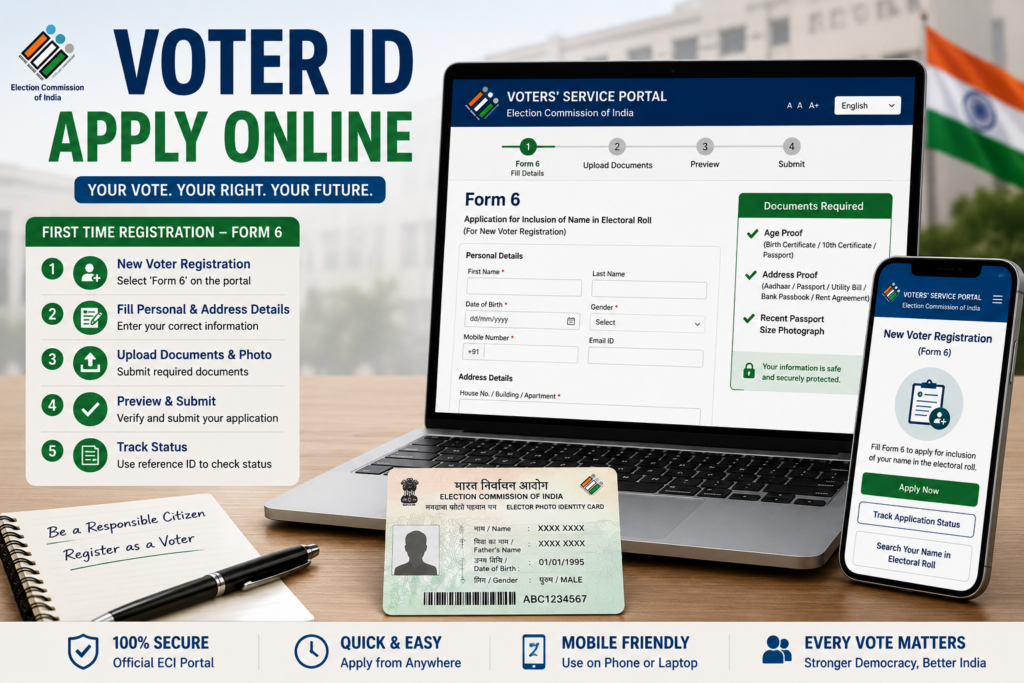
How to apply for Voter ID online
For a new general voter, the ECI’s prescribed application is Form 6. It can be submitted online through the ECI voter-service ecosystem. The ECI also permits offline submission through the relevant electoral authorities.
Online Voter ID application process
The broad process is:
- Open the official ECI Voter Service Portal.
- Choose New Voter Registration.
- Select Form 6.
- Enter the applicant’s personal information.
- Provide age/date-of-birth information.
- Enter ordinary-residence details.
- Upload the required supporting documents.
- Provide the photograph and other information requested by the form.
- Submit the application.
- Save the acknowledgement/application reference information for tracking.
The ECI’s current citizen portal directly lists New Voter Registration and identifies Form 6 for people who are 18 or above or who will turn 18 according to the applicable process.
Official portal: ECI Voter Service Portal
Can I apply for Voter ID offline?
Yes. Online registration is not the only route. The ECI says Form 6 can be submitted to the relevant Electoral Registration Officer (ERO) or Assistant Electoral Registration Officer (AERO). It can also be handed to the Booth Level Officer (BLO) of the relevant polling area or submitted by post to the appropriate electoral authority.
This is particularly useful for citizens who have limited digital access or need help navigating the application. The registration forms are also available free of cost through the relevant electoral offices and BLOs.
What documents are required for Voter ID?
For Form 6, the ECI requires a recent passport-size colour photograph and documentary proof relating to age/date of birth and residence, as applicable. The acceptable document list and accompanying guidelines are specified with the form.
The current Form 6 framework includes residence-proof examples such as:
- Aadhaar Card
- Indian Passport
- water, electricity or gas connection bill
- current passbook of a bank
- Revenue Department land records
- registered rent/lease deed
- registered sale deed
The exact document requirements should always be checked against the current Form 6 and the applicant’s circumstances rather than relying on an old internet list. The ECI’s current Form 6 guidance also provides for alternative documentation in situations where a listed residence document is not available.
Is Aadhaar mandatory for Voter ID?
The ECI states that Aadhaar details are not a mandatory condition for retaining an electoral-roll entry. Its “Myth vs Reality” information specifically says that an electoral-roll entry cannot be deleted merely because Aadhaar has not been submitted. Existing voters can voluntarily provide Aadhaar information through Form 6B, while the new-voter Form 6 contains a provision concerning Aadhaar.
This is an important distinction because Aadhaar and voter registration serve different purposes. Aadhaar should therefore not be presented as a universal substitute for the documents and information required under the electoral-registration process.
How to check Voter ID application status
After submitting a voter application, applicants should retain their reference or acknowledgement information. The ECI’s current Voter Service Portal provides Track Application Status, allowing users to check the progress of submitted forms.
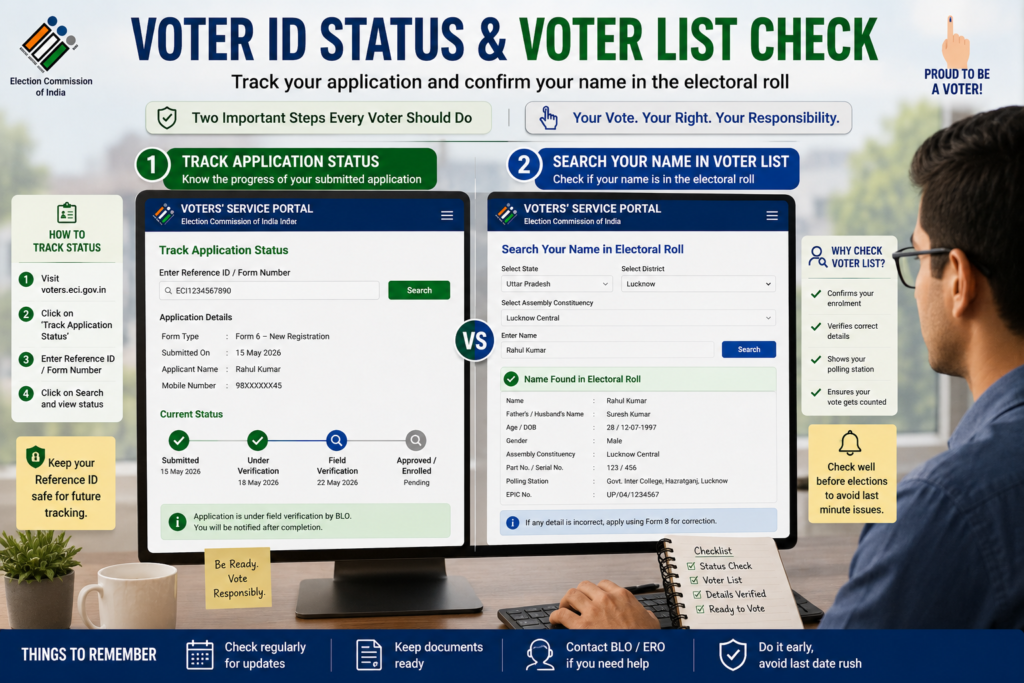
Steps to check application status
- Open the ECI Voter Service Portal.
- Select Track Application Status.
- Enter the information requested by the portal.
- Submit the details.
- Review the status and any further action indicated.
If the application is under verification, applicants should follow the instructions displayed by the electoral authorities rather than submitting repeated applications.
The portal also provides a facility to Book a Call with BLO, which can be useful when a citizen needs assistance regarding an electoral-registration matter.
How to check your name in the Voter List
Checking the voter list is one of the most important steps that should not be skipped. The ECI’s voter-service portal provides Search Your Name in Voter List, along with facilities to know polling details and information about the relevant MP/MLA.
Why should you check the voter list?
It can help identify problems such as:
- name not appearing;
- incorrect personal details;
- old address;
- incorrect constituency information;
- uncertainty about polling station;
- changes following an application;
- problems arising after shifting residence.
The practical lesson is straightforward: Do not rely only on an old Voter ID card. Verify your current electoral-roll information as well.
How to download Voter ID online
For eligible existing electors, the ECI provides an e-EPIC Download service. The current ECI citizen portal explicitly lists e-EPIC download among its voter services.
Basic e-EPIC download process
- Open the official ECI Voter Service Portal.
- Select E-EPIC Download.
- Provide the information requested by the portal.
- Complete the required verification/login process.
- Download the digital EPIC where the service confirms eligibility.
The exact interface and authentication steps can change, so users should follow the instructions currently displayed on the official portal.
What is e-EPIC?
e-EPIC means electronic Electoral Photo Identity Card. It is the digital version of the EPIC and forms part of the ECI’s digital voter-service ecosystem. The ECI describes the service as a way to obtain a digital version of the Electoral Photo Identity Card.
It is useful for citizens who want convenient access to their electoral identity document without depending entirely on the physical card. However, digital access to the EPIC should not replace the basic habit of checking the electoral roll.
How to correct Voter ID details online
Existing electors who find an error in their electoral details can use Form 8 for correction of entries. The current ECI forms dashboard identifies Form 8 for:
- shifting of residence;
- correction of entries;
- replacement of EPIC;
- marking of PwD.
Depending on the nature of the correction, supporting documentation may be required. Examples of details that may require correction include:
- name;
- gender;
- date of birth/age;
- address;
- photograph;
- other electoral-roll particulars covered by the form.
The important point is that a person who is already registered generally should not submit a fresh Form 6 simply because an existing detail is incorrect.
How to change address in Voter ID
If a voter has shifted residence, the electoral record should be updated through the prescribed process rather than leaving an outdated address indefinitely. Form 8 is used for shifting residence. The ECI’s Form 8 guidance states that an application for shifting is made to the ERO of the constituency in which the voter’s new address is located.
The current Form 8 system also distinguishes between shifting residence from one Assembly Constituency to another and shifting within an Assembly Constituency.
Documents for address change
The Form 8 guidance provides for an address-proof document in support of the new residence. It also allows specified alternative documentation where a listed document is unavailable.
The safest approach is to check the current Form 8 before submission because document requirements and portal instructions may be updated.
What if my Voter ID card is lost?
Losing the physical card does not automatically mean that a voter must register again as a new elector. For an existing elector who requires a replacement EPIC, the relevant process is generally Form 8. The current Form 8 specifically provides for replacement where an EPIC has been:
- lost;
- destroyed due to circumstances such as flood, fire or another natural disaster; or
- mutilated.
For a lost EPIC, the form guidance refers to submission of a copy of the FIR/police report and an undertaking to return the earlier EPIC if it is subsequently recovered. For a mutilated card, the old EPIC is to be returned as prescribed. The precise current procedure should be followed on the official portal when applying.
What if my Voter ID has the wrong photo?
A photograph-related correction can also be handled through Form 8. The Form 8 guidance states that where an applicant wants to change the photograph, a recent good-quality passport-size unsigned colour photograph with a white background is to be provided in the prescribed space when using the relevant form. For online applications, the portal may specify the digital upload requirements.
What are Form 6, Form 6A, Form 7, Form 8 and Form 6B?
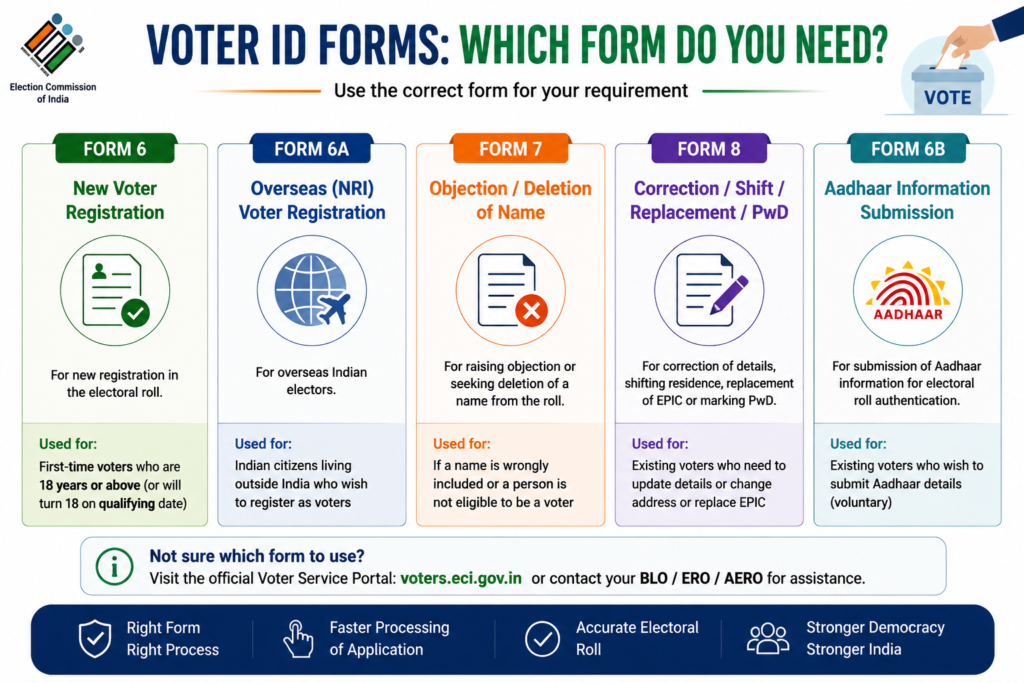
This is one of the most important sections for anyone searching for Voter ID information.
| Form | Main purpose |
| Form 6 | New registration of a general voter/elector |
| Form 6A | Registration of an overseas Indian elector |
| Form 6B | Providing Aadhaar information for electoral-roll authentication |
| Form 7 | Objection to proposed inclusion or request for deletion from electoral roll |
| Form 8 | Shifting residence, correction of entries, replacement of EPIC and marking of PwD |
The ECI’s current forms pages confirm these broad functions.
Form 6
Use Form 6 when you are seeking new registration as a general elector.
Form 6A
Form 6A is for an eligible overseas Indian elector.
Form 6B
Form 6B concerns providing Aadhaar information for electoral-roll authentication. Aadhaar submission is not a basis for deleting a voter merely because the voter does not submit it.
Form 7
Form 7 is used for deletion/objection matters concerning electoral-roll entries.
Form 8
Form 8 is the relevant form for several existing-voter services, including correction, shifting residence and replacement EPIC.
How to register as an NRI voter
An Indian citizen living outside India may fall under the overseas elector category if the relevant legal conditions are met.
The ECI specifies Form 6A for overseas Indian electors. The applicant must be an Indian citizen and must not have acquired citizenship of another country. The application is linked to the applicant’s place of ordinary residence in India as given in the passport, subject to the applicable rules.
The ECI also allows the prescribed documents to be submitted through the applicable online/offline process. An NRI should therefore not simply use the standard resident-voter process without first determining whether the overseas-elector procedure applies.
What is a Service Voter?
Service voters constitute a separate category within India’s electoral system. The ECI identifies three broad categories of electors in its FAQ material:
- General electors
- Overseas/NRI electors
- Service electors.
The registration process for service voters is different from ordinary general-voter registration. The ECI maintains a dedicated Service Voter Registration Portal, and the responsibility for enrolment involves the relevant record office/service process.
Therefore, a person covered by the service-voter category should use the prescribed service-voter mechanism rather than assuming that Form 6 is the universal route.
What is ERO, AERO and BLO?
These abbreviations appear frequently during voter registration.
- ERO: Electoral Registration Officer: The ERO is the electoral authority responsible for electoral-roll work for the relevant constituency.
- AERO: Assistant Electoral Registration Officer: The AERO assists with electoral-registration functions.
- BLO: Booth Level Officer: The BLO works at the polling-area level and can assist with electoral-roll-related processes.
The ECI’s registration guidance specifically mentions ERO/AERO and BLO as channels through which Form 6 can be submitted. The current voter-service portal also provides a Book a Call with BLO facility.
What if my application is rejected or there is a problem?
The ECI’s citizen portal provides mechanisms for complaints, suggestions and appeals. The current portal lists Register Complaint / Share Suggestion, application tracking, BLO contact and Submit Appeal/Track Appeal facilities.
The practical sequence should be:
First check application status → understand the reason/action required → contact the appropriate electoral authority/BLO where necessary → use the complaint or appeal mechanism when appropriate.
Submitting multiple fresh applications without understanding the status of the original request may create confusion rather than solve the problem.
What is SIR 2026 and why might it appear on the voter portal?
As of August 31, 2026, the ECI’s current voter-service portal prominently displays services connected with Special Intensive Revision (SIR) 2026 in applicable areas. The portal currently includes options such as:
- Fill Enumeration Form
- Search Your Name in Last SIR
- Submit Document Against Notice issued
- Download Electoral Roll.
This should not be confused with ordinary new-voter registration.
SIR is an electoral-roll revision exercise. Where the ECI or the concerned State Chief Electoral Officer is conducting an applicable SIR process, citizens should follow the specific instructions and deadlines communicated for their area.
The current portal also provides a facility to search names in a previous SIR electoral roll where applicable. Because revision schedules and state-specific procedures can change, readers should verify SIR instructions on the official ECI/State CEO portal rather than relying on an old article or social-media post.
How to find your polling station and BLO
The ECI’s voter-service system provides facilities for finding polling-related information. The portal’s voter-list search service can provide polling details, while the ECI’s voter-service information also identifies online access to polling-station and BLO information.
This is useful before an election because the polling station associated with a voter should not be assumed merely from memory or from a previous election. A practical pre-election check is therefore:
Name in voter list + correct details + polling station + relevant electoral identity document.
Can Voter ID be used as proof of address?
A common misconception is that every identity document automatically proves every type of personal information. Voter ID is fundamentally connected with electoral identity and registration. Whether it can be accepted as a particular type of proof for a separate government, banking, financial or legal service depends on the requirements of that service.
Therefore, citizens should not assume that a Voter ID will automatically satisfy the document requirements of another department. For electoral registration itself, the ECI prescribes its own age and residence documentation requirements through the relevant forms.
Can one person have two Voter IDs?
The electoral system is designed around a person’s enrolment as an elector in the appropriate electoral roll, not around accumulating multiple voter cards. If a person moves, the correct approach is to update the electoral registration through the prescribed shifting process, rather than treating a new address as a reason to create an unnecessary duplicate registration.
For an existing elector changing residence, the ECI provides Form 8 for shifting of residence. This is one reason why citizens should avoid filing a fresh Form 6 merely because they have moved from one place to another.
What happens after submitting Form 6?
The application enters the electoral-registration process, where the information and supporting documentation may be examined and verification may be carried out as prescribed. The applicant should therefore:
- save the application/reference number;
- track the application;
- respond to any official request;
- check the electoral roll after the application is processed;
- verify polling information.
The ECI explicitly advises registered voters to check their enrolment status.
Can I apply for Voter ID from my mobile phone?
Yes. The ECI provides digital voter services through its web portal and Voter Helpline mobile application. The Commission’s registration guidance identifies the Voter Helpline App and the voter-service website as routes for registration and electoral-roll services.
The mobile route is particularly useful for citizens who want to complete registration, check electoral information or access voter services without visiting an electoral office for every task.
What should you do before an election?
A sensible voter should not wait until polling day to discover a registration problem.
A useful checklist is:
1. Search your name
Confirm that your name appears in the current electoral roll.
2. Check personal details
Look for spelling, age/date-of-birth, gender and other relevant information.
3. Check your address
If you have moved, ensure that your electoral registration reflects the appropriate residence.
4. Check polling station
Confirm the polling station and other available polling information.
5. Check your EPIC/e-EPIC
Ensure that you can access your electoral identity information.
6. Resolve discrepancies early
Use the appropriate ECI form instead of waiting until the last moment.
Voter ID: The most important difference between “card” and “registration”
The easiest way to understand India’s voter system is to separate three things.
Electoral roll
This is the official record of electors.
EPIC
This is the Electoral Photo Identity Card associated with an elector.
e-EPIC
This is the digital version of the EPIC.
The ECI’s current digital architecture reflects all three dimensions by providing electoral-roll search, application services and e-EPIC download as separate citizen services.
For ordinary citizens, this distinction has a direct practical consequence: having a card is not a substitute for verifying electoral enrolment.
What the evidence suggests
The direction of India’s voter services is increasingly digital, but the underlying administrative responsibility has not changed.
The ECI provides online registration, application tracking, electoral-roll search, e-EPIC download, polling information, BLO contact and complaint/appeal facilities.
The digital transition reduces the need for citizens to visit an office for every routine service. At the same time, it places greater emphasis on citizens checking their own records and responding to official verification requirements.
The most useful habit is therefore not simply “keep your Voter ID safe”. It is:
Keep your electoral information accurate, check your enrolment, and use the correct ECI service when something changes.
Complete Voter ID Quick Reference
| Requirement/Problem | What to do |
| New voter | Apply through Form 6 |
| Eligible overseas Indian | Apply through Form 6A |
| Aadhaar information for electoral-roll authentication | Form 6B |
| Correction in existing electoral entry | Form 8 |
| Shifted residence | Form 8 |
| Lost/damaged/mutilated EPIC | Form 8 |
| Deletion/objection | Form 7 |
| Check name in voter list | ECI voter-service portal |
| Check application status | Track Application Status |
| Download digital Voter ID | e-EPIC Download |
| Find polling details | Search Voter List/ECI services |
| Need BLO assistance | Book a Call with BLO |
| Complaint | ECI complaint service |
| Appeal | ECI appeal facility |
| SIR-related activity | Follow applicable ECI/State CEO SIR instructions |
The ECI’s current forms dashboard and citizen-service portal support these broad service categories.
Final Takeaway
Voter ID should not be understood merely as a card that proves someone is a voter. India’s electoral system is built around accurate electoral-roll enrolment, with EPIC and e-EPIC forming important identity components of that system.
For a first-time voter, the route begins with eligibility and Form 6. For an existing voter, the correct solution may instead be Form 8, electoral-roll verification, e-EPIC access or a replacement request. Overseas electors and service voters follow their own procedures. The ECI’s digital portal now brings many of these services together, but the responsibility for checking one’s electoral information remains important.
The safest approach is therefore not to search randomly for a “Voter ID website”. Use the official Election Commission services, select the form that matches your actual situation, retain your application reference, check the electoral roll after processing and resolve discrepancies well before an election.
For current services, forms and election-specific instructions, always give priority to the official Election Commission of India and the concerned State Chief Electoral Officer over third-party websites.